
What is a business associate agreement? A business associate agreement (BAA) is a written contract that HIPAA requires between a health care organization and a vendor that creates, receives, maintains or transmits protected health information for it. It limits what the vendor may do with that information and commits the vendor to safeguard it, report breaches and bind its own subcontractors.
Your clinic picks a new billing service. The sales call goes well. The contract arrives. Then someone asks: "Did they sign a BAA?"
Nobody is sure what that means, who signs it, or what it has to say. This guide answers all three, with the rule text behind each answer.
Quick Summary
- A business associate agreement is the written contract HIPAA requires before a vendor handles protected health information for a covered entity.
- A business associate is any person or company outside your workforce that creates, receives, maintains or transmits that information on your behalf.
- The contents are set by 45 CFR 164.504(e): permitted uses, safeguards, breach reporting, subcontractors, access, and return or destruction at the end.
- Subcontractors of a business associate need the same kind of agreement, all the way down the chain.
- Business associates are directly liable under HIPAA since the 2013 Omnibus Rule, and civil penalties reach $73,011 USD per violation (2025 amounts).
What Is a Business Associate Agreement?
A business associate agreement is the contract HIPAA uses to make a vendor protect patient information the way the health care organization must. HIPAA lets a covered entity share protected health information with a business associate only if it gets "satisfactory assurance that the business associate will appropriately safeguard the information", and the BAA is where that assurance is written down.
The rule is in 45 CFR 164.502(e): those assurances "must be documented through a written contract or other written agreement or arrangement with the business associate." Some vendors call it an addendum or an amendment. Amazon Web Services calls its version a Business Associate Addendum, and Google calls its version a Business Associate Amendment. The name does not matter; the required terms do.
Microsoft sums up the purpose on its HIPAA page: "a Business Associate Agreement establishes the permitted and required uses and disclosures of PHI by the business associate." Our guide to HIPAA-compliant file sharing shows where the BAA fits among the other safeguards.
Who Is a Business Associate Under HIPAA?
A business associate is a person or company, other than a member of your workforce, that creates, receives, maintains or transmits protected health information on behalf of a covered entity, or provides services such as legal, accounting, consulting or management work that involve receiving that information.
Covered entities are health plans, health care clearinghouses and health care providers that transmit health information electronically in standard transactions. The definition of business associate in 45 CFR 160.103 lists typical functions: "claims processing or administration, data analysis, processing or administration, utilization review, quality assurance", billing, benefit management, practice management and repricing.
| Usually a business associate | Usually not a business associate |
|---|---|
| Billing company or claims processor | Another doctor receiving records to treat the patient |
| Cloud storage or document storage company | The U.S. Postal Service or a parcel courier |
| Outside lawyer or accountant who receives patient information | An internet service provider that only carries data |
| IT support or practice-management software vendor with routine access | Your own employees (they are workforce members) |
| A subcontractor that stores or processes data for one of your vendors | A vendor that never receives protected health information |
Based on 45 CFR 160.103 and the 2013 Omnibus Rule, checked on November 22, 2026. The facts of each relationship decide.
The Conduit Exception
Pure carriers are not business associates. HHS calls the conduit exception "a narrow one", meant to exclude only "mere courier services, such as the U.S. Postal Service or United Parcel Service and their electronic equivalents", such as internet service providers.
Storage is different. In the same rule HHS says "a data storage company that has access to protected health information (whether digital or hard copy) qualifies as a business associate, even if the entity does not view the information." The difference, in HHS's words, is "the transient versus persistent nature of that opportunity."
When Is a Business Associate Agreement Required?
A business associate agreement is required before a covered entity lets a business associate create, receive, maintain or transmit protected health information on its behalf. The HIPAA Security Rule says the same for electronic records: the vendor may handle them "only if" the covered entity first obtains satisfactory assurances.
Timing matters. Dropbox's help centre puts it plainly: a BAA "must be in place before the transfer of PHI from the covered entity to the business associate." Signing after the first upload leaves a gap in which the vendor already holds patient information without the required terms.
A BAA is not needed for every disclosure. The definition excludes a health care provider receiving information "concerning the treatment of the individual", so a referral to a specialist does not call for one. It also does not apply to companies that never touch protected health information, such as a cleaning service.
What Must a Business Associate Agreement Include?
A business associate agreement must establish the permitted uses and disclosures of protected health information and commit the business associate to safeguards, breach and incident reporting, subcontractor agreements, patient access and amendment support, record access for HHS, and return or destruction of the information when the contract ends.
| Required term | What the business associate agrees to | Rule |
|---|---|---|
| Permitted uses | Use or disclose the information only as the contract allows or the law requires | 164.504(e)(2)(i), (ii)(A) |
| Safeguards | Use appropriate safeguards and follow the Security Rule for electronic records | 164.504(e)(2)(ii)(B); 164.314(a) |
| Reporting | Report uses or disclosures the contract does not allow, security incidents and breaches | 164.504(e)(2)(ii)(C); 164.314(a) |
| Subcontractors | Make subcontractors agree to the same restrictions and conditions | 164.504(e)(2)(ii)(D) |
| Patient rights | Make information available for access, amendment and an accounting of disclosures | 164.504(e)(2)(ii)(E)–(G) |
| HHS access | Open its books and records on the information to the Secretary of HHS | 164.504(e)(2)(ii)(I) |
| End of contract | Return or destroy the information, or extend the protections if that is not feasible | 164.504(e)(2)(ii)(J) |
| Termination | Allow the covered entity to end the contract if the business associate breaks a material term | 164.504(e)(2)(iii) |
Summary of 45 CFR 164.504(e) and 164.314(a), checked on November 22, 2026.
The contract may not authorize the vendor to use the information in a way that would break the Privacy Rule if the covered entity did it, with two exceptions: the vendor's own "proper management and administration" and data aggregation services for the covered entity's health care operations.
Breach Notice Deadlines
Under 45 CFR 164.410, a business associate that discovers a breach of unsecured protected health information must notify the covered entity "without unreasonable delay and in no case later than 60 calendar days after discovery of a breach." HHS encourages covered entities to spell out in the BAA how, when and to whom the business associate must report a possible breach.
Do Subcontractors Need a Business Associate Agreement?
Yes. A subcontractor that creates, receives, maintains or transmits protected health information for a business associate is itself a business associate under HIPAA, so the business associate must sign a BAA with it, just as the covered entity signed one with the business associate.
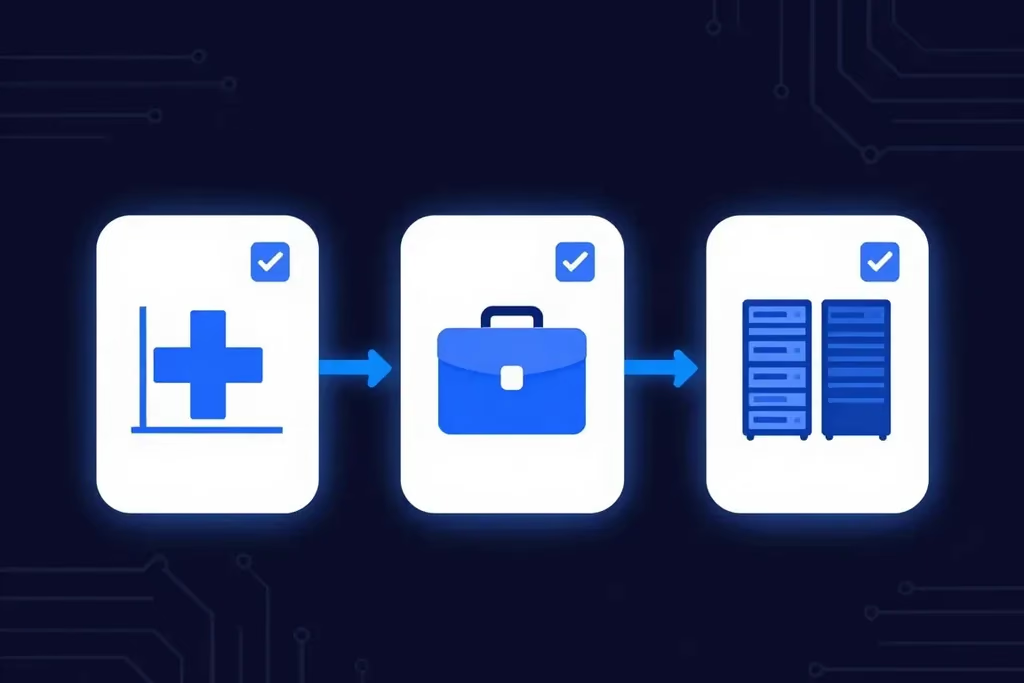
The covered entity does not sign with the subcontractor directly. The rule says "A covered entity is not required to obtain such satisfactory assurances from a business associate that is a subcontractor." The business associate does that instead.
HHS explained in the 2013 Omnibus Rule that "each agreement in the business associate chain must be as stringent or more stringent as the agreement above" on permitted uses and disclosures. A billing company that stores claims with a cloud provider therefore needs a BAA with that provider, and the cloud provider's terms cannot be looser.
Is There a Sample Business Associate Agreement?
Yes. HHS has published sample business associate agreement provisions on its website. They are a starting point, not a complete contract: HHS says their use "is not required for compliance with the Rules", and that the language should be amended to reflect the actual business arrangement.
Large cloud vendors offer their own standard agreements, usually accepted online rather than negotiated:
| Vendor | What it calls the agreement | How you get it |
|---|---|---|
| Google Workspace | Business Associate Amendment | Administrators review and accept it in the Admin console |
| Microsoft | HIPAA Business Associate Agreement | Included in the Microsoft Online Services Data Protection Addendum for covered entities and business associates |
| Amazon Web Services | Business Associate Addendum | Reviewed and accepted in AWS Artifact |
| Dropbox | Business associate agreement | Signed electronically by a team admin; online signing is for US-based customers |
From each vendor's own HIPAA page, checked on November 22, 2026. Each agreement covers only the services the vendor lists.
Read the scope before you rely on it. Google, for example, says "Customers who have not signed a BAA with Google must not use PHI in Google Workspace or Cloud Identity services." Details on Google's HIPAA page, Microsoft's HIPAA page, AWS's HIPAA page and Dropbox's HIPAA overview.
What Happens If You Do Not Have a Business Associate Agreement?
Without a business associate agreement, a covered entity that shares protected health information with a vendor is out of compliance with HIPAA's business associate rules, and the vendor is exposed too: since the 2013 Omnibus Rule, business associates are directly liable for certain HIPAA requirements and can face civil money penalties.
The Omnibus Rule set out to "make business associates of covered entities directly liable for compliance with certain of the HIPAA Privacy and Security Rules' requirements." Liability also runs up the chain: under 45 CFR 160.402(c), a covered entity is liable for violations by its agents, "including a workforce member or business associate".
Civil penalties reach $73,011 USD per violation, with a calendar-year cap of $2,190,294 USD for identical violations (2025 amounts, published by HHS in the Federal Register on January 28, 2026). Our article on HIPAA violations examples shows how everyday mistakes turn into fines.
A signed BAA is also not a pass. If a covered entity knows of "a pattern of activity or practice" by the business associate that breaks the agreement, it must take reasonable steps to fix it and, if that fails, end the contract where feasible.
Does a Business Associate Agreement Apply to Canadian Businesses?
A business associate agreement applies to a Canadian business only when it works for a U.S. covered entity or business associate and handles that organization's protected health information. HIPAA is a U.S. law; Canadian clinics serving Canadian patients follow PIPEDA and provincial health privacy laws instead.
If a U.S. client sends you a BAA to sign, you are being treated as its business associate. Read it with a lawyer, and check that your own vendors can meet the same terms, because the subcontractor rule reaches them too. For Canadian records, see our guide to Canada's HIPAA equivalent, which covers PIPEDA and Ontario's PHIPA.
Sending Files to Vendors and Partners More Safely
This is where SureSend comes into the picture. A BAA says who may handle the information. You still have to move the files to the right person without leaving copies in inboxes. SureSend is a Canadian secure file transfer service that sends files through a passphrase-protected link that expires on a date you choose. SureSend encrypts every file while it's sent and while it's stored (TLS in transit, AES-256 at rest).
Here is exactly how it works:
- Create a transfer. Sign in, add one or more recipient email addresses, upload your files, and choose an expiry date of up to 21 days.
- Set a passphrase. SureSend emails each recipient a secure link, but the passphrase is never included in that email. You share it separately, by phone or text.
- The recipient downloads. They open the link, enter the passphrase, and download the files. They do not need a SureSend account.
- Track and control it. Your dashboard shows when the transfer is retrieved. You can cancel it before it is downloaded, and it expires automatically.
Each transfer allows one successful download. If the download is interrupted, the recipient can try again until one download completes; after that the link cannot be used again, and the transfer's status updates to Retrieved.
Your dashboard lists every transfer with its status, so you can see when a file was retrieved, and cancel a transfer sent in error before it is downloaded.
Be clear about one thing. If you are a U.S. covered entity or business associate, HIPAA requires a business associate agreement with any service that stores your patients' files, SureSend included. Confirm that in writing before you send protected health information through any provider. SureSend does not claim HIPAA compliance, and a secure transfer tool is one control within your own privacy program, not a compliance solution on its own.
For files that are not protected health information, such as contracts, tax documents or financial records, you can start on the free Starter plan. Pro is $7 CAD/month plus applicable taxes, with transfers up to 2 GB, and your recipient needs no account. SureSend doesn't keep your files forever; they're removed when the transfer expires.
Send Sensitive Files Without Leaving Copies in Inboxes
SureSend encrypts every file while it's sent and while it's stored: TLS in transit and AES-256 encryption at rest. Send up to 2 GB per transfer, protect it with a passphrase you share separately, set an expiry of up to 21 days, and see when it is retrieved. Your recipient needs no account. New subscribers get 30 days of Pro free, with no credit card required. Start sending securely for free.
A Quick Workflow That Works
Before a new vendor touches patient information, run through this list:
- List every vendor that will create, receive, store or send protected health information for you.
- Rule out the ones that do not need a BAA: treating providers, pure conduits, vendors with no access.
- Get a signed BAA from each remaining vendor before the first file moves.
- Check the BAA against 45 CFR 164.504(e): permitted uses, safeguards, reporting, subcontractors, patient rights, HHS access, return or destruction, termination.
- Ask each vendor which subcontractors will handle the information and whether they have signed BAAs too.
- Keep the signed agreements on file and review them when the service or the rules change.
If you can send an email, you can SureSend a file.
Frequently Asked Questions
What is a business associate agreement in simple terms?
A business associate agreement is a contract between a HIPAA covered entity and a vendor that handles protected health information for it. It says what the vendor may do with the information and commits the vendor to protect it, report breaches and bind its subcontractors.
When is a business associate agreement required?
A business associate agreement is required before a covered entity lets a business associate create, receive, maintain or transmit protected health information on its behalf. It is not required for disclosures to another health care provider for the patient's treatment.
Who needs to sign a business associate agreement?
The covered entity and the business associate sign it. A business associate that uses a subcontractor to handle protected health information signs a separate agreement with that subcontractor.
What is the purpose of a business associate agreement?
Its purpose is to document the satisfactory assurances HIPAA requires that a vendor will safeguard protected health information. It sets permitted uses and disclosures and makes the vendor's obligations enforceable by contract.
Is there a free business associate agreement template?
HHS publishes sample business associate agreement provisions on its website. HHS says using them is not required for compliance and that the language should be adapted to the actual business arrangement, so have a lawyer review the final contract.
Does Microsoft sign a business associate agreement?
Yes. Microsoft says its HIPAA Business Associate Agreement is available through the Microsoft Online Services Data Protection Addendum by default to customers who are covered entities or business associates, for in-scope services.
Does a cloud storage company need a business associate agreement?
Yes, if it stores protected health information for a covered entity or business associate. HHS says a data storage company qualifies as a business associate even if it does not view the information.
Is SureSend HIPAA compliant?
SureSend does not claim HIPAA compliance. SureSend encrypts files in transit (TLS) and at rest (AES-256), and SureSend manages the encryption keys. Check your own legal obligations before sending protected health information.
Sources
This article draws on the following sources, checked on November 22, 2026. Regulations and vendor terms change, so confirm the current version on each page. This article is general information, not legal advice.
- Legal Information Institute, Cornell Law School. 45 CFR § 160.103: Definitions (business associate, covered entity, subcontractor). law.cornell.edu
- Legal Information Institute, Cornell Law School. 45 CFR § 164.502(e): Disclosures to business associates. law.cornell.edu
- Legal Information Institute, Cornell Law School. 45 CFR § 164.504(e): Business associate contracts. law.cornell.edu
- Legal Information Institute, Cornell Law School. 45 CFR § 164.308(b): Business associate contracts and other arrangements (Security Rule). law.cornell.edu
- Legal Information Institute, Cornell Law School. 45 CFR § 164.314(a): Business associate contracts (Security Rule). law.cornell.edu
- Legal Information Institute, Cornell Law School. 45 CFR § 164.410: Notification by a business associate. law.cornell.edu
- Legal Information Institute, Cornell Law School. 45 CFR § 160.402: Basis for a civil money penalty. law.cornell.edu
- U.S. Department of Health and Human Services, Federal Register. Modifications to the HIPAA Privacy, Security, Enforcement, and Breach Notification Rules (Omnibus Rule, January 25, 2013). govinfo.gov
- U.S. Department of Health and Human Services, Federal Register. Annual Civil Monetary Penalties Inflation Adjustment (January 28, 2026). govinfo.gov
- Google Workspace Admin Help. HIPAA compliance with Google Workspace and Cloud Identity. support.google.com
- Microsoft Learn. HIPAA and the HITECH Act. learn.microsoft.com
- Amazon Web Services. HIPAA Compliance. aws.amazon.com
- Dropbox Help Center. HIPAA/HITECH overview and business associate agreements. help.dropbox.com
The Bottom Line
A business associate agreement is the contract that makes a vendor protect patient information the way you must. Know who your business associates are, get the agreement signed before the first file moves, and check that it says what 45 CFR 164.504(e) requires.
Sign the BAA first. Then send the file the right way.